How to Export HubSpot Data: A Guide
Contacts, deals, companies, lists, reports, property history, and continuous sync.
rawquery itself doesn't use HubSpot. Our stack is Umami for analytics and Paddle for billing: two tools, one invoice each, no CRM yet. But HubSpot is what most of the people who try our product run, so we tested every export path against a HubSpot account we have through another project, and joined it with that project's Stripe data inside a rawquery workspace.
There are three reasons people want HubSpot data out of HubSpot:
- Backup: before churning, before a CRM migration, or just to sleep at night.
- Analysis: HubSpot's reports stop the moment you want to join with Stripe charges or filter on a property they didn't pre-bake into a dashboard.
- Continuous sync: because a CSV is a snapshot, and your warehouse needs the data fresh.
What HubSpot's native export gives you (and what it doesn't)
HubSpot has two native export paths. They are not interchangeable.
- Per-object export from inside Contacts, Companies, Deals, Tickets etc. You choose columns, you get a CSV/XLSX by email. Works on the free CRM. This is what most people mean when they say "export HubSpot data".
- Account-wide export from Settings → Account Defaults → Privacy & Consent → Export your account data. One zip, everything in it. Required by GDPR for data portability. Only one paid seat can trigger it.
Neither gives you property history. Neither gives you the associations between objects in a way that's easy to rejoin. The account-wide one drops a folder structure that takes more effort to make sense of than hitting the API directly.
| What you want | Native export | API | Notes |
|---|---|---|---|
| Current property values | Yes | Yes | The easy part |
| Custom properties | Yes | Yes | Add them to the view first |
| Property change history | No | Yes | /properties-history endpoint |
| Associations (deal → contact, contact → company) | Partial | Yes | Native export gives IDs only, no labels |
| Engagement timeline | No | Yes | Calls, meetings, emails, notes |
| Email event log | No | Yes | Marketing side |
| List membership snapshot | Yes | Yes | Static and dynamic lists |
| List rules (the filter logic) | No | Yes | The rule that defines a dynamic list |
| Free CRM throughput | 1 file / 3 min, async, emailed when ready | ||
The per-object export works the same way on every plan. The hard limit is one export at a time per user, queued and emailed when ready. HubSpot doesn't publish a row cap; community reports put it in the high tens of thousands, with delivery taking 10 to 20 minutes at that volume.
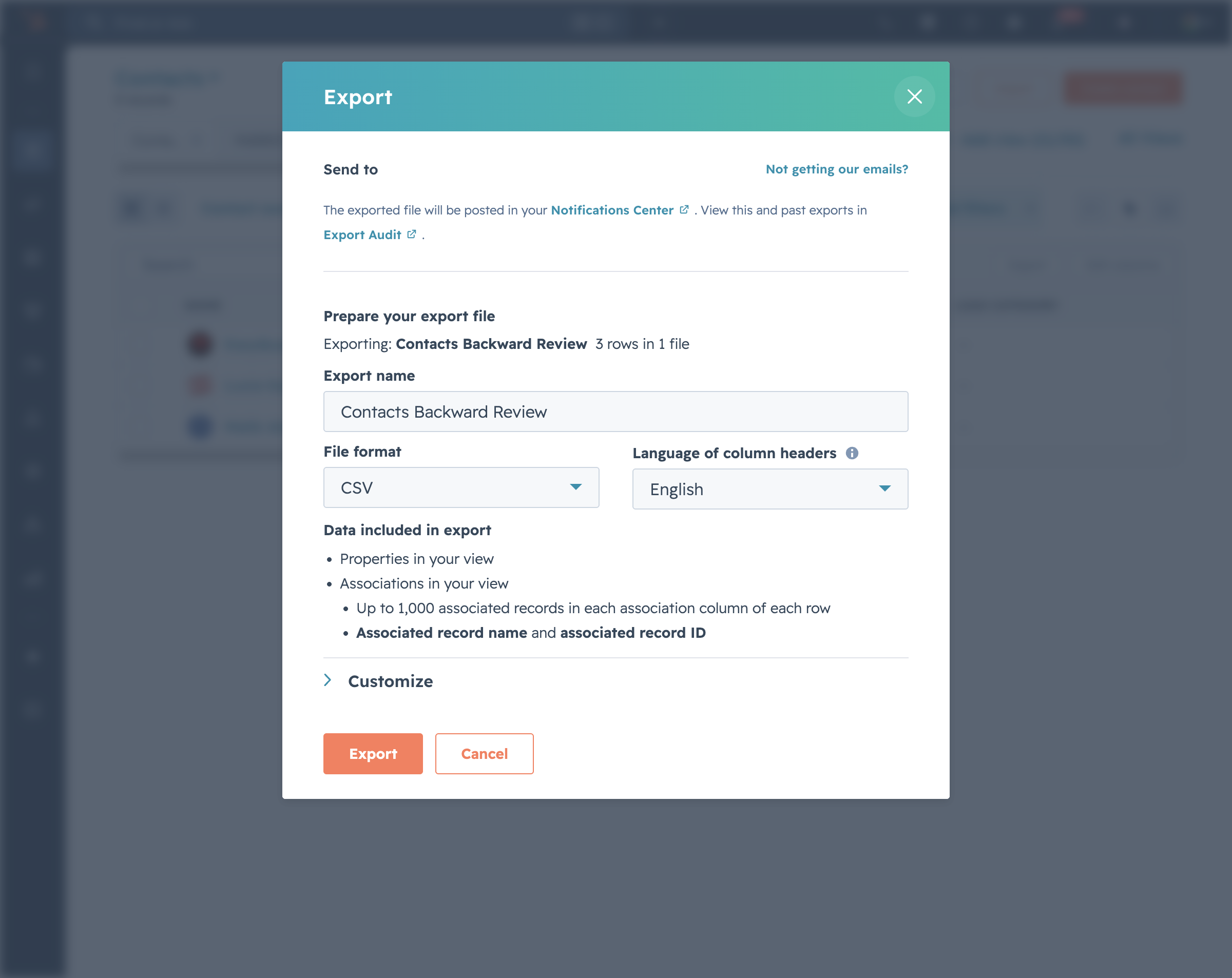
Exporting contacts from HubSpot
The path: CRM → Contacts → Export (the button is right next to Import and Create contact in the top-right of the contacts list). The export is scoped to your current view, so a saved view filter is the easiest way to export a subset, and the columns it produces are the columns shown in that view. Format choice (CSV, XLS), language, and the Customize options round out the modal.
Archived contacts are excluded by default. If you're exporting for backup, switch the view filter to include them, or you'll be missing rows you didn't know you had.
There's no column picker inside the export modal. Go back to the view, click Edit columns, set what you need, then export. Custom properties are at the bottom of that picker, alphabetically.
Inside the modal, the Customize section has the choice that controls what you actually get: Properties and associations in your view vs All properties on records. The first uses the columns from your view (typically 5 to 15). The second ignores the view and dumps every property HubSpot has for each row (often 200 to 400+). Use the second for backups, the first for analysis.
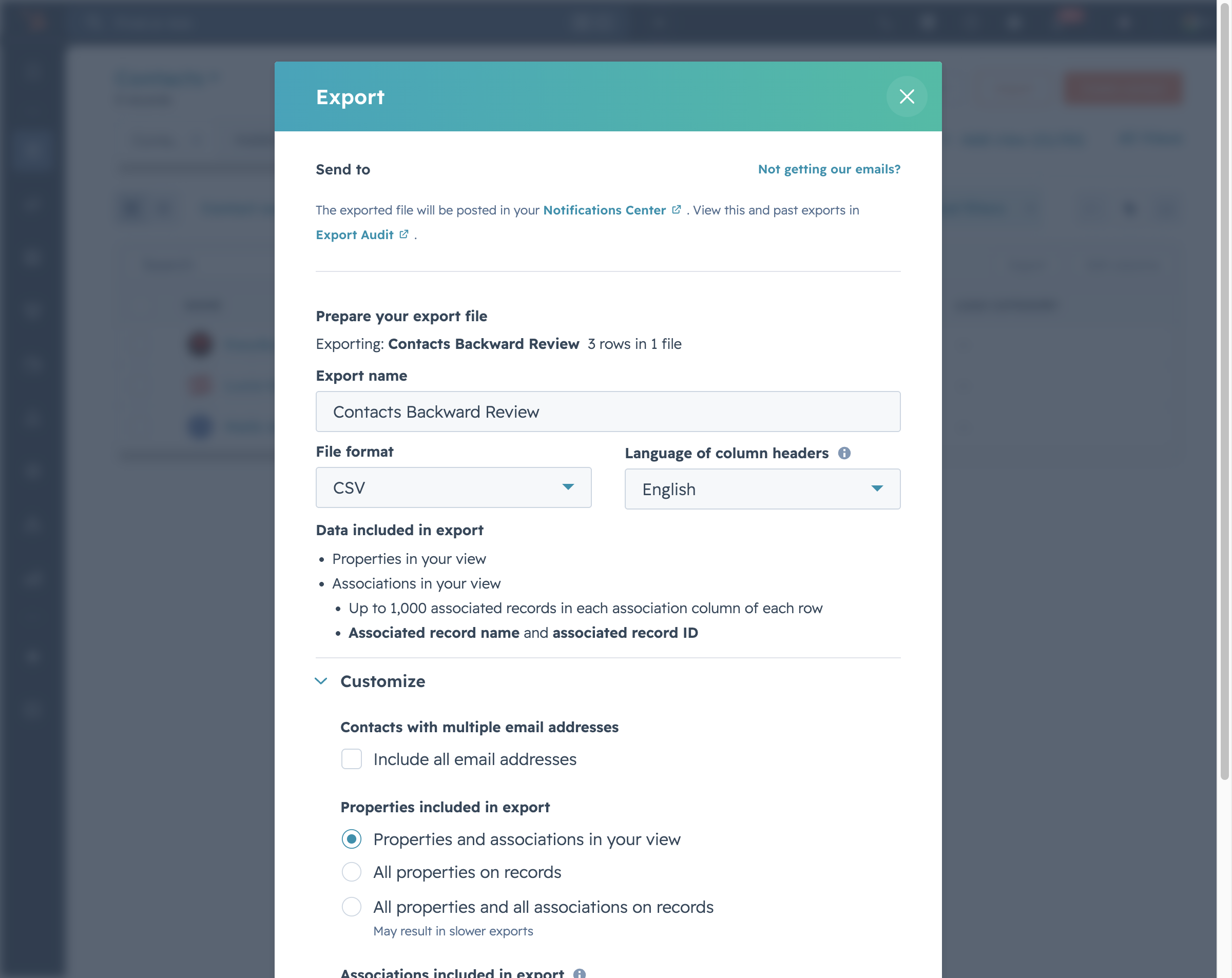
For very large contact bases (above ~100k), the email export still works but you'll want to script against the API instead. Paginate /crm/v3/objects/contacts with limit=100 and follow the paging.next.after cursor. The API is the only path that gives you the full row count up front.
Exporting deals, companies, and tickets
Same UI pattern, different object. The trap is associations. A deals export gives you the deal record and its primary associated contact and company as IDs, not labels, not the full association graph, and not the multi-association case (a deal with two contacts).
If your follow-up question is "which contacts are on which deals", the per-object export will mislead you. Export contacts and deals separately and join them yourself in a spreadsheet, or hit the associations endpoint:
curl --request GET \ --url 'https://api.hubapi.com/crm/v4/objects/deals/{dealId}/associations/contacts' \ --header 'authorization: Bearer YOUR_PRIVATE_APP_TOKEN'curl --request GET \ --url 'https://api.hubapi.com/crm/v4/objects/deals/{dealId}/associations/contacts' \ --header 'authorization: Bearer YOUR_PRIVATE_APP_TOKEN'Tickets work identically. Custom objects work identically too: same export button, same view-driven columns, same association quirk.
Exporting property history
Property history (every change to a property over time, with timestamp and source) is not in the UI export. Not as an option, not as a checkbox, not as a separate menu. If you want to know when a deal moved from Qualified to Proposal sent, the CSV will give you the current stage and that's it.
The only path is the API. HubSpot exposes propertiesWithHistory as a query parameter on object reads:
curl --request GET \ --url 'https://api.hubapi.com/crm/v3/objects/deals/12345?propertiesWithHistory=dealstage,amount' \ --header 'authorization: Bearer YOUR_PRIVATE_APP_TOKEN'curl --request GET \ --url 'https://api.hubapi.com/crm/v3/objects/deals/12345?propertiesWithHistory=dealstage,amount' \ --header 'authorization: Bearer YOUR_PRIVATE_APP_TOKEN'The response includes a propertiesWithHistory object: each property name maps to an array of {value, timestamp, sourceType, sourceId} entries, oldest to newest. Pagination is per-property: the array stops at 100 entries by default. For high-churn properties on long-lived records, you have to request the same record multiple times with the archived and pagination flags.
This matters for two real questions: deal velocity (time spent in each stage), and attribution decay (when a lifecycle stage changed relative to a campaign send). Neither has a native HubSpot dashboard. Both are one SQL query away once the history is in a warehouse.
Exporting lists, including the rule that defines them
Lists in HubSpot are either static (membership frozen at creation) or active (re-evaluated against a filter rule whenever a contact changes). Both can be exported from the list view, same way as contacts.
The catch: an active list export gives you a snapshot of who is on the list right now, not the rule that defines it. If you're backing up your HubSpot setup before a migration and you have 80 active lists, the CSVs will not preserve any of the filter logic. The rule lives in the API:
curl --request GET \ --url 'https://api.hubapi.com/crm/v3/lists/{listId}' \ --header 'authorization: Bearer YOUR_PRIVATE_APP_TOKEN'curl --request GET \ --url 'https://api.hubapi.com/crm/v3/lists/{listId}' \ --header 'authorization: Bearer YOUR_PRIVATE_APP_TOKEN'The response includes filterBranch, the filter tree as JSON. Save this if you want to reproduce the list elsewhere.
Exporting reports (CSV, Excel, PDF)
From any saved report: ⋯ menu → Export. Three formats: CSV, XLS, PDF. PDF gives you the rendered chart; CSV/XLS give you the underlying rows the report aggregates.
Report exports are useful for sending the rendered output to someone who's not in HubSpot. They're a poor source for downstream analytics: the rows are pre-aggregated by the report's grouping. If you want flexibility, export the underlying objects, not the report.
Sending HubSpot data somewhere useful
Once you have the CSV (or the API JSON), what do you do with it? The path depends on the destination.
Excel or Google Sheets
Open the CSV. Done. The only gotcha: HubSpot quotes commas inside fields correctly, but some property values contain newlines (notes, free-text custom properties), which Excel handles fine but Google Sheets occasionally splits across rows. If your row count after import doesn't match the export, that's why. Open in Excel, save as XLSX, then upload.
PostgreSQL or Redshift
Three options, in increasing order of effort and decreasing order of long-term pain.
- Manual
COPY FROMthe CSV into a Postgres table. Works for one-off backups. Breaks the moment HubSpot adds a column. - A scheduled Python script that paginates the HubSpot API and upserts into Postgres. You own the schema drift, the rate limit handling, the property history pagination, and the on-call when HubSpot changes the API. Works, but you're building a connector.
- Fivetran, Airbyte, or rawquery: a managed connector. Fivetran prices on monthly active rows (MAR); their own example for a 1-200 employee company on the Standard plan lands at $549/month, scaling with the objects you sync. Airbyte OSS is free if you self-host, but you're running the infrastructure. rawquery lands the data as Parquet tables on S3 and lets you query it without a warehouse on top.
Tableau or Power BI
Both have native HubSpot connectors. Both work for small accounts. Both struggle with property history and large engagement volumes because the connectors pull on-demand and don't cache. At any non-trivial scale, the standard pattern is HubSpot → warehouse → Tableau/Power BI on top of the warehouse.
JSON
The API returns JSON natively. curl | jq gets you most of the way for one-off pulls. For repeated pulls, the same logic as Postgres: at some point you want a managed connector instead of a script you maintain.
Doing it continuously
Every method above is a snapshot. The CSV you exported yesterday is wrong today. The dashboard your CFO is looking at is from last Tuesday.
For continuous sync, you have three real choices:
| Option | Setup | Maintenance | Cost | Schema drift |
|---|---|---|---|---|
| Custom Python + cron | 2 to 5 days | You | Engineer time | You handle it |
| Fivetran | 30 min | Fivetran | $549/mo (their published Standard example) | Fivetran handles it |
| Airbyte (self-hosted OSS) | 1 day | You (infra) | Hosting + your time | Airbyte handles it |
| rawquery | 5 min | rawquery | Flat, predictable | rawquery handles it |
Fivetran wins on connector breadth (300+) and on a UI that data teams already know. It loses on pricing: MAR means the bill grows with your CRM whether you're querying that data or not. Airbyte wins on cost if you're comfortable running it, and loses on the "running it" part.
rawquery is the right pick under ~10 TB, in EU jurisdiction, when you want to query without a warehouse on top.
What it looks like in rawquery
We connected the HubSpot account to a rawquery workspace and pointed Stripe at the same workspace.
Connect HubSpot
HubSpot uses OAuth, so the connection is created from the dashboard rather than the CLI. Connections → Add Connection → HubSpot → Connect with HubSpot. You authorize on HubSpot's side, you land back on rawquery, the connection is live. Five clicks, no JSON config.
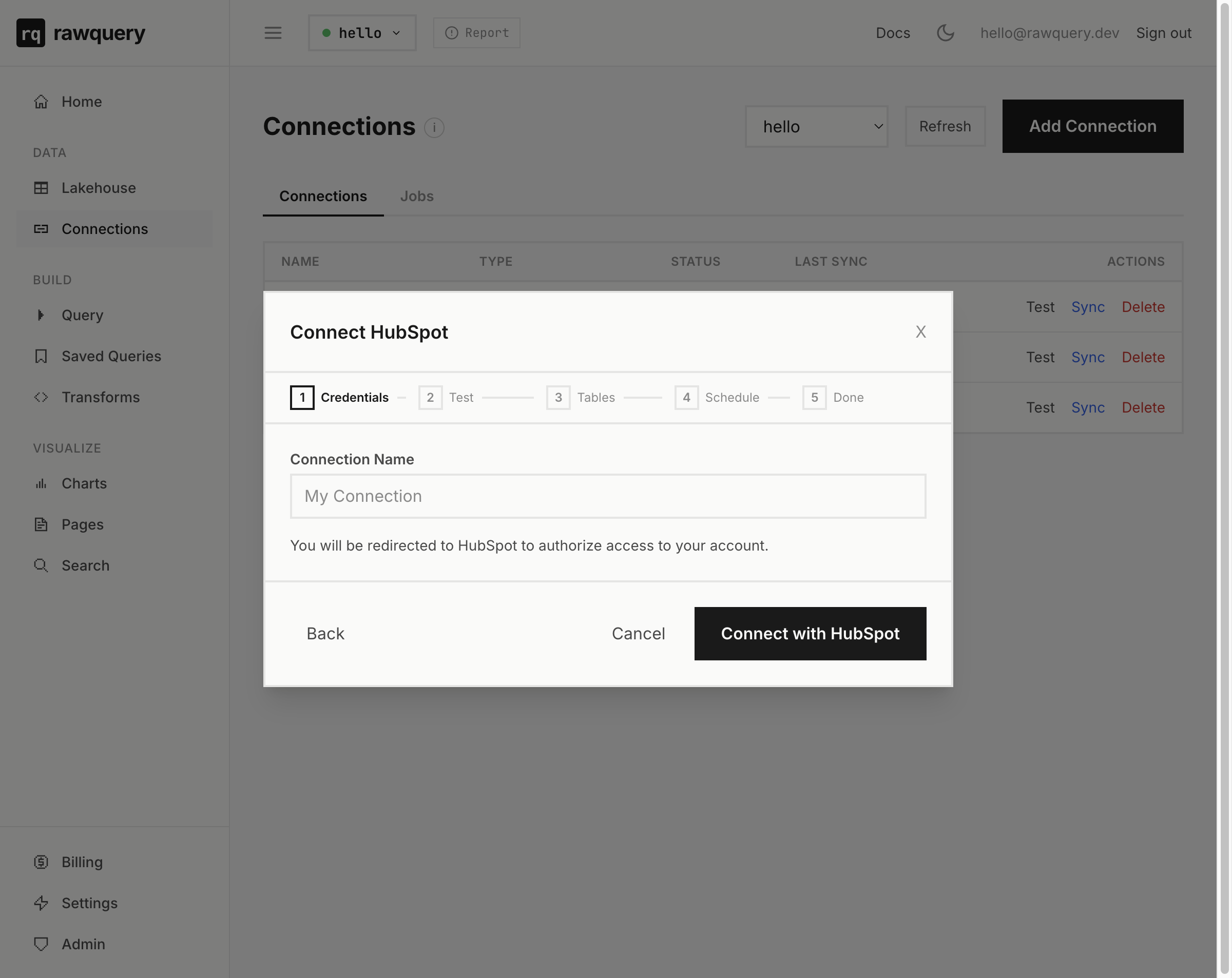
Sync
After OAuth lands you back on rawquery, the wizard's Tables step lists every HubSpot object you can sync: contacts, companies, deals, tickets, engagements, email events, lists. You pick what you need, you set a schedule (hourly, daily, weekly, or on-demand), and you're done. The data lands as Parquet tables on S3 within a few minutes.
From the CLI, you can trigger an on-demand sync any time:
rq connections sync hubspotrq connections sync hubspotQuery
Pipeline by close month, plain SQL:
SELECT DATE_TRUNC('month', closedate)::DATE AS month, COUNT(*) AS deals, ROUND(SUM(amount), 0) AS pipeline_valueFROM hubspot.dealsWHERE closedate >= '2025-01-01'GROUP BY 1ORDER BY 1 DESCSELECT DATE_TRUNC('month', closedate)::DATE AS month, COUNT(*) AS deals, ROUND(SUM(amount), 0) AS pipeline_valueFROM hubspot.dealsWHERE closedate >= '2025-01-01'GROUP BY 1ORDER BY 1 DESCIn the raw export, dealstage is HubSpot's internal numeric ID. Join the pipelines API to translate IDs to labels, or skip the issue by aggregating on closedate.
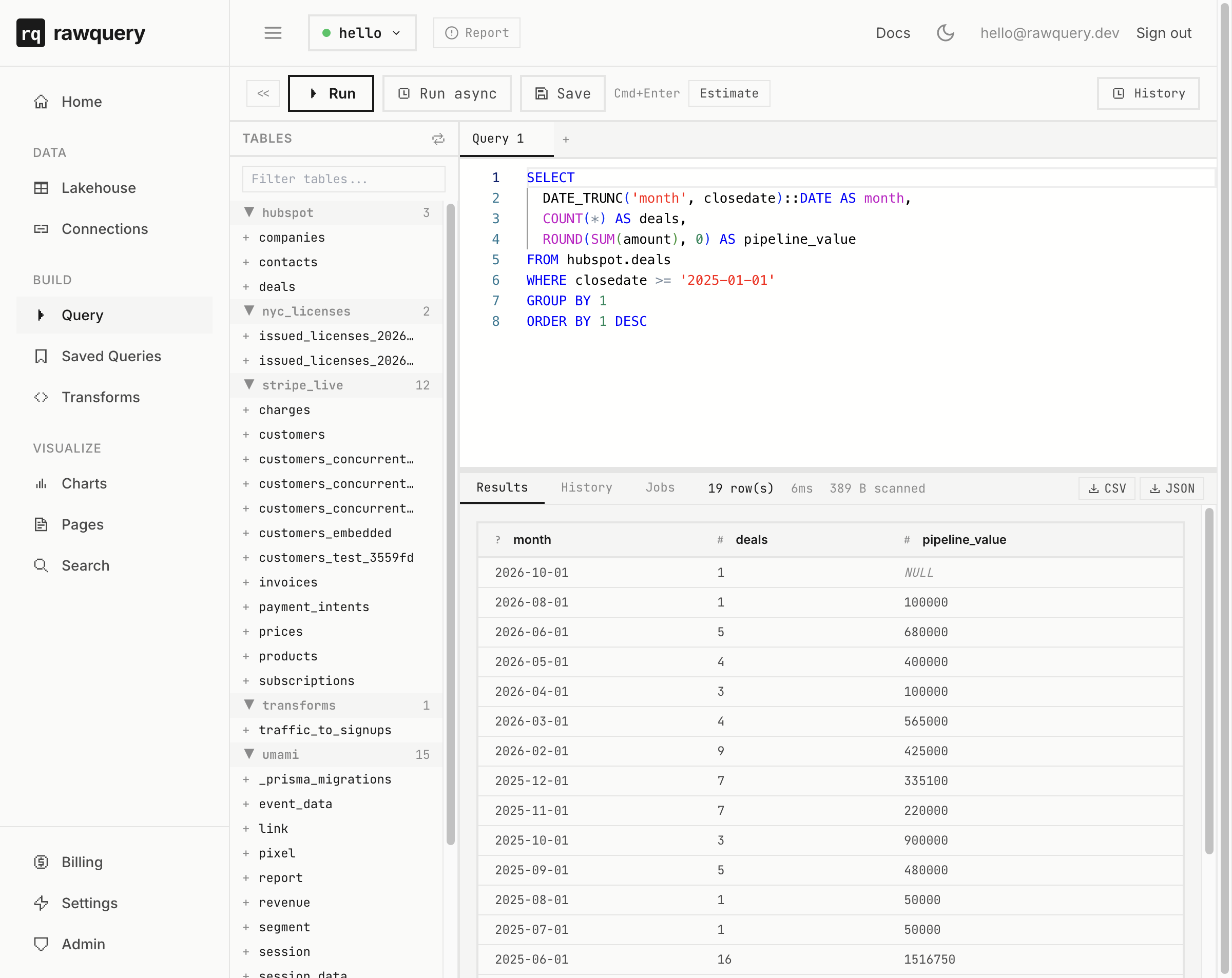
And the query HubSpot reports can't do, because half the answer lives in Stripe: how many Stripe customer records match HubSpot contacts at each lifecycle stage. A Stripe customer record alone does not establish that someone has paid.
SELECT c.lifecyclestage, COUNT(DISTINCT c.id) AS hubspot_contacts, COUNT(DISTINCT s.id) AS with_stripe_accountFROM hubspot.contacts cLEFT JOIN stripe_live.customers s ON LOWER(s.email) = LOWER(c.email)GROUP BY 1ORDER BY hubspot_contacts DESCSELECT c.lifecyclestage, COUNT(DISTINCT c.id) AS hubspot_contacts, COUNT(DISTINCT s.id) AS with_stripe_accountFROM hubspot.contacts cLEFT JOIN stripe_live.customers s ON LOWER(s.email) = LOWER(c.email)GROUP BY 1ORDER BY hubspot_contacts DESC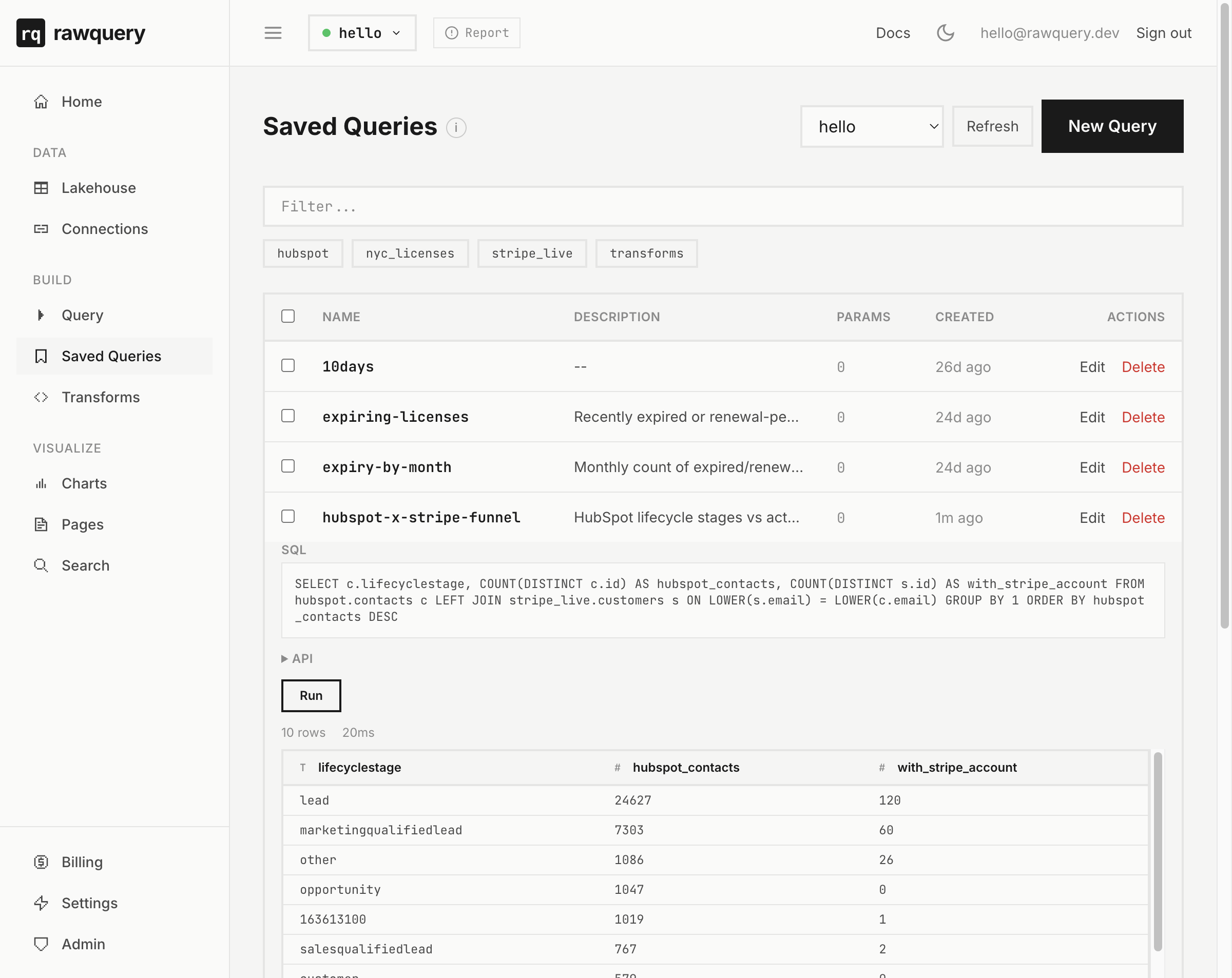
That query does not need a Snowflake warehouse on top of a Fivetran sync to a dbt-modelled fact table. Same SQL, two synced sources, one workspace. HubSpot lifecycle stages and actual Stripe customer status drift apart over time.
Where rawquery is weaker
We have eight built-in connectors today (Postgres, MySQL, Stripe, HubSpot, Salesforce, Shopify, Google Sheets, plus a generic HTTP connector for anything else via JSON spec). Fivetran has 300+. If you need Marketo, Zendesk, NetSuite, or one of the long tail of B2B SaaS connectors, Fivetran or Airbyte will get you there faster.
Free CRM data export limits
Yes, the free CRM lets you export. The per-object export works. You don't get the account-wide GDPR export (paid plans only), and the API is rate-limited to 100 requests per 10 seconds on the free tier.
rawquery syncs your CRM and billing data into one workspace. Ask through Claude or use SQL, then save the answer. Start free. See the browser setup.